
How Can You Perform Zoom and HubSpot Integration?
Integrating Zoom with HubSpot CRM can significantly enhance the efficiency of your sales and marketing efforts by aligning your digital communication tools with your customer relationship management system. In today’s remote-centric business environment, Zoom has become an indispensable tool for virtual meetings, webinars, and communications. When professional Hubspot consultants integrate Zoom with HubSpot CRM, you unlock a host of benefits, such as automatic meeting updates, easy scheduling, and the ability to track webinar engagements directly within HubSpot. Now, let’s dive into the steps of how a web development company can integrate Zoom with your HubSpot CRM to maximize your team’s productivity.
Steps to Integrate Zoom with HubSpot CRM
Log In to Your HubSpot Account: Start by logging into your HubSpot account. Make sure you have administrative access as this is required to enable integrations.

Navigate to the Marketplace: From your HubSpot dashboard, go to the main navigation menu, select ‘Marketplace’, and then click on ‘App Marketplace’.

Search for Zoom: In the App Marketplace, use the search bar to find the Zoom integration. You will see options for Zoom and possibly specific integrations for Zoom Webinars if you need those features.

Select the Zoom Integration: Click on the Zoom integration option. This will open a detailed page where you can see more information about what the integration entails and the benefits it offers.

Install the Integration: Click on ‘Install app’. You will be redirected to sign into your Zoom account to authorize the integration.
Authorize HubSpot to Access Zoom: Log into your Zoom account and authorize the connection between Zoom and HubSpot. You will need to approve the required permissions, allowing HubSpot to access your Zoom account information.
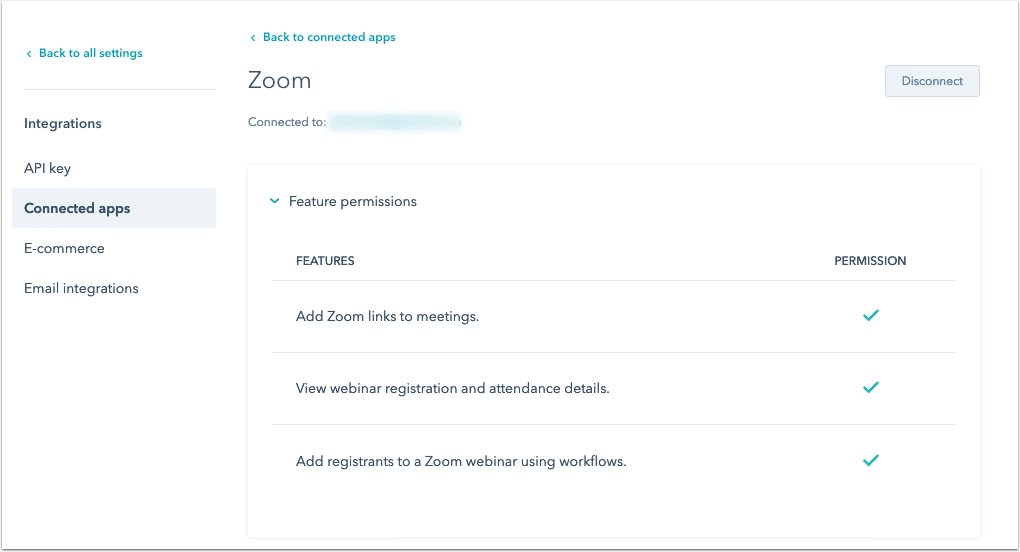
Configure Integration Settings: After authorization, return to HubSpot to configure your integration settings. This might include setting up how meetings are logged in HubSpot, syncing webinar participants as contacts, and other preferences that align with your business processes.
Test the Integration: To ensure the integration is working properly, schedule a test meeting or webinar in Zoom through HubSpot. Check if the meeting details are logged correctly in your CRM.
Train Your Team: Inform and train your team on how to use the Zoom integration within HubSpot. Highlight how they can schedule meetings directly from a contact’s record and how webinar attendance can be tracked for leads.
Conclusion
The integration of Zoom with HubSpot CRM is a game-changer for businesses looking to optimize their communication and data management strategies. By combining Zoom’s robust video conferencing functionalities with HubSpot’s comprehensive customer insights, companies can enhance their customer engagement and achieve a more streamlined workflow. If you hire a website developer, this integration not only saves time but also ensures that all customer interactions are recorded and leveraged for future engagement strategies.

Akshima Jain
Content Production Manager