
Viram Rathod
July 7, 2026
HTTP QUERY method explained: Everything developers need to know (With Node.js & PHP examples)
For years, one question has been common among backend developers:
“How should I build a complex search API?”
If you’ve built a CRM, ERP, HRMS, analytics dashboard, AI application, or reporting system, you’ve probably faced this challenge.
For simple searches, the HTTP GET method works perfectly.
But what happens when your search includes dozens of filters, nested objects,arrays, sorting, pagination, and date ranges?
Most developers eventually switch to POST, even though they’re only reading data.
Now, HTTP finally has a better solution.
The new HTTP QUERY method was introduced to solve exactly this problem.
In this article, we’ll explain what the HTTP QUERY method is, why it was
introduced, how it differs from GET and POST, when you should use it,
and how to implement it in both Node.js and PHP.
Whether you’re building a SaaS platform, REST API, enterprise software,or AI-powered application, this is a feature worth understanding.
Why GET isn’t always enough
Imagine you’re building an employee management system.
Your users want to search employees based on multiple conditions:
- Department
- Experience
- Skills
- Salary range
- Office location
- Joining date
- Current project
- Manager
- Employment type
- Pagination
- Sorting
Using GET, your request might look like this:
GET
/employees?department=Engineering&experience=5&skills=node,react,aws&salaryMin=60000&salaryMax=120000&page=1&limit=20&sort=joiningDate
Although this works, it quickly becomes difficult to read and maintain.
As the number of filters increases, the URL becomes longer and more complicated.
Many browsers, reverse proxies, CDNs, API gateways, and web servers also impose URL length limits. While the exact limit depends on theinfrastructure, relying on very long URLs is never a good idea.
Why developers started using POST for search
To avoid long URLs, many APIs started using POST.
Instead of placing everything inside the URL, developers moved the filters into a JSON body.
POST /employees/search
Content-Type: application/json

{
  "department": "Engineering",
  "skills": [
    "Node.js",
    "React"
  ],
  "experience": {
    "gte": 5
  },
  "salary": {
    "min": 60000,
    "max": 120000
  }
}
From a developer’s perspective, this is much cleaner.
However, it introduces another problem.
POST is traditionally used when something changes on the server, such as creating a user, updating a record, or processing data.
Searching doesn’t modify anything.
It’s simply reading information.
Using POST for search has worked for years, but it has never been a perfect semantic fit.
Meet the new HTTP QUERY method
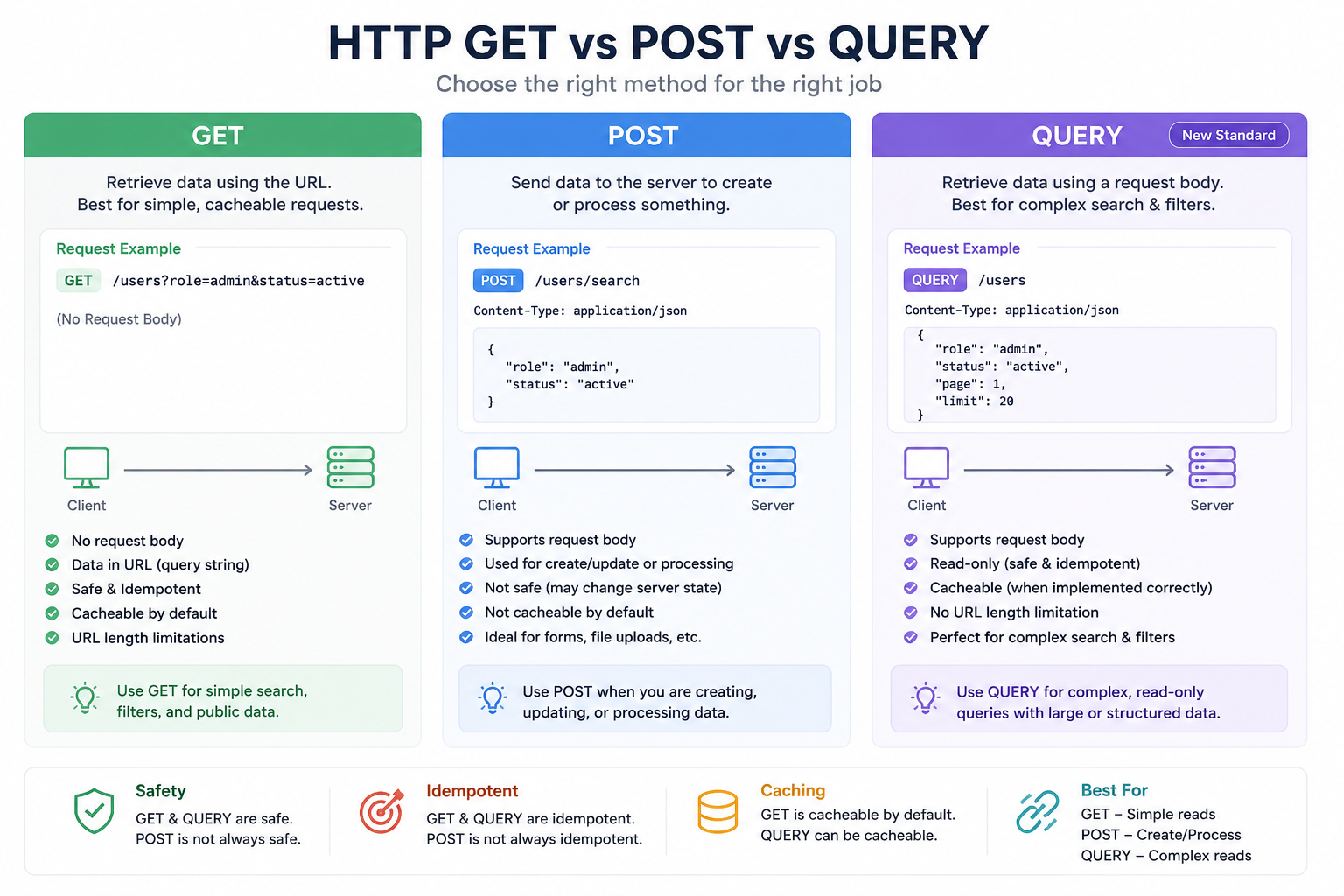
The HTTP QUERY method was introduced to bridge the gap between GET and POST.
Think of it as:
A GET request that allows a request body.
That’s the easiest way to understand it.
Like GET:
- It is a read operation.
- It is safe.
- It is idempotent.
Like POST:
- It allows sending a JSON request body.
This means developers no longer have to misuse POST for complex searches.
A Simple Comparison
| Feature | GET | POST | QUERY |
|---|---|---|---|
| Reads data | ✓ | ✓ | ✓ |
| Creates or updates data | ✕ | ✓ | ✕ |
| Supports request body | Usually No | Yes | Yes |
| Safe operation | ✓ | ✕ | ✓ |
| Idempotent | ✓ | Not always | ✓ |
| Best for complex filtering | ✕ | Good | Excellent |
A Real-World Example
Imagine you’re building a CRM where sales managers search customers using many filters.
Instead of this:
GET
/customers?city=London&industry=IT&employees=100&revenue=1000000&status=Active&page=1
You can simply write:
QUERY /customers
Content-Type: application/json

{
  "city": "London",
  "industry": "IT",
  "employees": {
    "gte": 100
  },
  "revenue": {
    "gte": 1000000
  },
  "status": "Active",
  "page": 1,
  "limit": 20
}
Much easier to read.
Much easier to maintain.
Much easier to extend in the future.
What kind of applications benefit most?
The QUERY method is particularly useful for applications where users perform advanced searches.
Examples include:
- CRM software
- ERP systems
- HRMS platforms
- Reporting dashboards
- BI tools
- AI search applications
- Analytics platforms
- Inventory systems
- Healthcare software
- Financial applications
- Elasticsearch APIs
- Log management platforms
If your API already has endpoints like:
POST /search
POST /filter
POST /query
POST /reports/search
there’s a good chance the QUERY method was designed for exactly your usecase.
How large can the request be?
One common question developers ask is:
“How much data can I send inside a QUERY request?”
Unlike GET, QUERY sends data inside the request body.
That means you’re no longer restricted by URL length.
However, there isn’t a fixed size limit defined by the HTTP specification.
The limit depends on your infrastructure:
- Web server
- Reverse proxy
- CDN
- Load balancer
- API Gateway
- Application framework
In practice:
- A few KB is perfectly normal.
- Even 50–100 KB JSON payloads are generally manageable when your infrastructure allows them.
- Very large payloads should still be avoided because they increase processing time and network overhead.
If your request contains files, images, or binary data, POST remains the correct choice.
How does caching work?
With GET requests, caching is simple because the URL itself becomes the cache key.
QUERY introduces a new challenge.
Two requests may have the same URL but different request bodies.
For example:
{
    "status": "Active"
}
and
{
    "status": "Inactive"
}
Both target the same endpoint.
The only difference is the JSON body.
A caching system therefore needs to consider both:
- Request URL
- Request Body
This gives much more flexibility but also requires infrastructure that understands QUERY semantics.
Implementing QUERY in Node.js
One of the nice things about Node.js is that HTTP methods are simply strings.
If the client sends a QUERY request, Node.js can already detect it.
import http from "http";
const server = http.createServer((req, res) => {

    if (req.method === "QUERY") {

        let body = "";

        req.on("data", chunk => body += chunk);

        req.on("end", () => {

            const filters = JSON.parse(body || "{}");

            res.writeHead(200, {
                "Content-Type": "application/json"
            });

            res.end(JSON.stringify({
                success: true,
                filters
            }));
        });
    }
});

server.listen(3000);
The logic is almost identical to handling a POST request.
The only difference is the HTTP method.
Express.js Example
If you’re using Express, the implementation is also straightforward.
app.all("/employees", (req, res) => {

    if (req.method !== "QUERY") {

        return res.status(405).json({
            message: "Method Not Allowed"
        });

    }
    res.json({
        filters: req.body
    });
});
PHP Example
PHP applications can also detect the QUERY method.
if ($_SERVER['REQUEST_METHOD'] === 'QUERY') {

    $filters = json_decode(
        file_get_contents("php://input"),
        true
    );

    echo json_encode($filters);

}
The implementation is very similar to handling JSON POSTrequests.
Should you start using QUERY today?
This is probably the biggest question.
The answer is:
Not for every production API yet.
Although QUERY is now an official HTTP standard, many browsers, API gateways, reverse proxies, CDNs, and frameworks are still catching up.
Some infrastructure may reject unknown HTTP methods.
Because of this, most production APIs today still use:
POST /search
for complex search operations.
That’s perfectly acceptable.
A smart migration strategy
If you’re designing a new API today, don’t rush to replace everything.
Instead:
Today:
POST /employees/search
Future:
QUERY /employees
Since the request body remains exactly the same, migration becomes mucheasier once support becomes widespread.
Our recommendation
If you’re building internal enterprise software or experimenting with modernAPIs, the QUERY method is definitely worth exploring.
For public production APIs, continue using POST for complex search requests until support across browsers, proxies, CDNs, and frameworks becomes more consistent.
The important takeaway isn’t that GET or POST are becoming obsolete.
They’re not.
Instead, HTTP is finally getting a dedicated method designed specifically for complex read operations.
That’s something developers have wanted for many years.
Final thoughts
The introduction of the HTTPQUERY method is a small change to the HTTP specification, but it has the potential to improve API design across the industry.
Instead of choosing between an overly long GET request and a semantically incorrect POST request, developers now have a dedicated method designed for structured, read-only queries.
It won’t replace GET.
It won’t replace POST.
But it fills a gap that developers have worked around for years.
As tooling and framework support continue to improve, don’t be surprised if QUERY becomes a common part of modern REST API design.
If you’re designing APIs today, understanding QUERY now will put you ahead of the curve tomorrow.
About our team
This article was written by the engineering team at Binstellar Technologies,
where we build scalable SaaS platforms, enterprise CRMs, AI applications,
and cloud-native backend systems for businesses worldwide.
Written by
Viram Rathod